1
Drop in the PDFs
Add up to 10 statements. Confirm the bank ledger for each one.
HDFC_October.pdfText read · Ready to map
ICICI_October.pdfText read · Ready to map
Turn bank statement PDFs into entries ready for Miracle. Map each line to its ledger, without retyping.
For CA firms and accountants who keep books in Miracle.
Bring the statements. Check the matches. Take the entries into Miracle.
Add up to 10 statements. Confirm the bank ledger for each one.
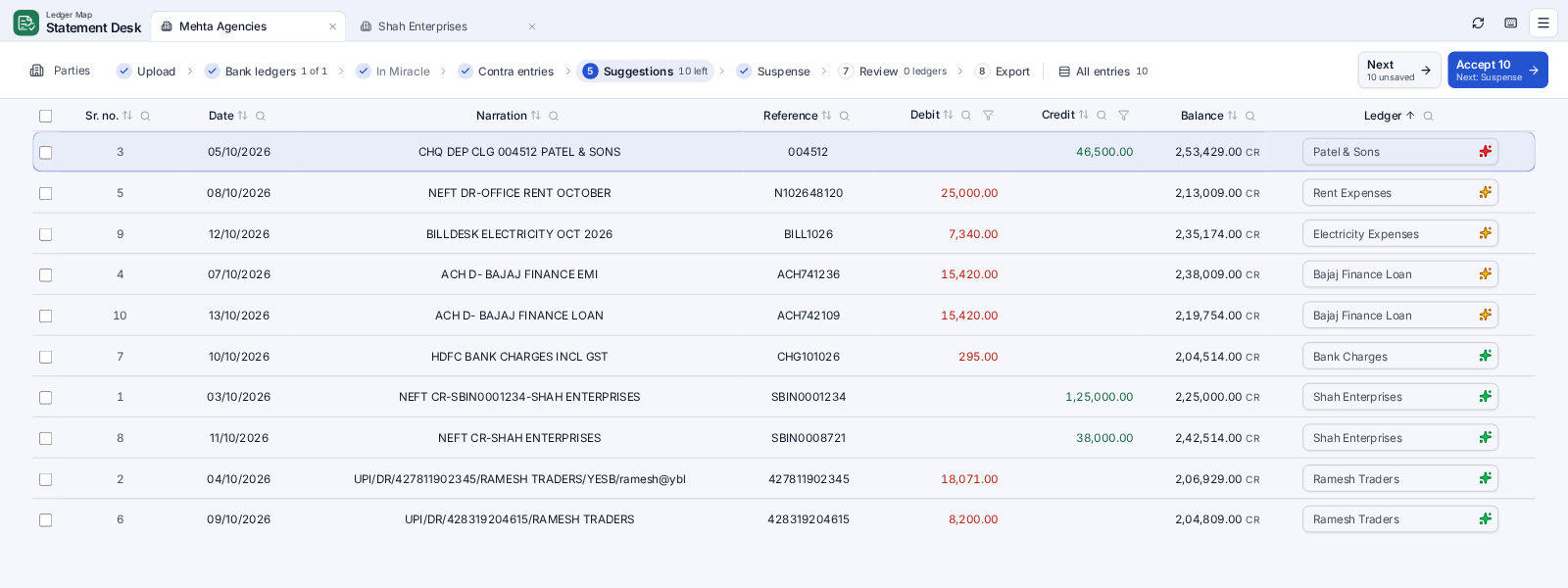
Start with the doubtful ones. Accept a match or choose another ledger.
Review entries by ledger. Export them, then import them into Miracle.
Let Ledger Map find the clues. Keep control of every ledger choice.
Map a UPI ID, account number, or narration once. Your exported choices help with the next import.
Pairs transfers between your own banks. Check possible matches and split transfers before you accept.
Checks the bank ledger in your Miracle books. Entries already there stay out of the export.
Green, yellow, and red confidence marks make the entries that need your attention easy to find.
Reads text-based statements, checks the balances, and learns new bank layouts with AI.
Enter a password once for a party. Later locked statements can open with its saved passwords.
Suggestions start with the lowest confidence. Spend your attention where it counts.
| Date | Description | Balance (₹) |
|---|---|---|
| 03/10/2026 | NEFT CR-SHAH ENTERPRISES | 3,41,220.50 |
| 04/10/2026 | UPI/DR/RAMESH TRADERS | 3,23,249.50 |
| 06/10/2026 | ATW-CASH WDL MG ROAD | 3,13,249.50 |
Running balances are checked against the entries. If something does not add up, you can see where to look.
Built for the keyboard, from the first PDF to the final export.
One party per tab, just like a browser. Switch with Ctrl + Tab. Your tabs and work survive a restart.
Clear boundaries around the files and choices that matter.
Company folders are read on your computer. Ledger Map never writes to the original Miracle files.
An administrator approves each account and computer before it can use Ledger Map.
Find entries that Miracle is missing or has twice, then correct the books with a clear list.
Updates download in the background. Restart the app to use the latest version.
Miracle company files stay on your PC; the server receives the company link and ledger list. Statement PDFs are processed on the server. For a new layout, AI receives extracted statement text, never the PDF or its password.
Statement Desk is available now. These three desks are coming next.
Make a GST return-ready JSON file and a voucher Excel file for Miracle from Amazon, Flipkart, and Meesho sales.
Build a balance sheet from the books, with both sides checked.
Compare a party’s ledger or balance sheet with your books. See which entries differ and why.
Pay every month, or pay for the year and save.
Access is by invitation: Infocado sets up your account and approves your PCs.
What to know before your first import.
Ledger Map reads text-based statement PDFs from any bank. If a layout is new, AI can learn a reusable reading recipe. Every running balance is checked against the entries.
Yes. Enter the password once. It is remembered for that party, so later statements can open without asking again. The unlocked PDF keeps its selectable text.
No. It reads company folders on your PC and prepares entries for you to import into Miracle. It never changes the original Miracle files.
The In Miracle step checks each bank entry against the bank ledger in your books. Entries already present are left out, so they do not get exported twice.
Scanned, image-only PDFs are not supported yet. Use a statement PDF with selectable text from your bank.
Access is by invitation. Use Request access to contact Infocado. An administrator must approve your account and PC. You can download the Windows app using the download button.
Give each bank entry a ledger. Give your time back to the books.
Windows app · Access by invitation